


Okudu AI - Create Stories
4.2350.00 Reviews
App Specs
- Version
- 1.2.108
- Updated On
- License
- Free
- Downloads
- 50,000+
- Developer
- Okudu
- Categories
- Books & Reference
- Platform
- Android
Screenshots
 Analysis by AppCompare
I see Okudu AI - Create Stories as a playful starting point for people who want to shape a story without facing a blank page alone. Its appeal is the quick movement from an idea to a draft, with room to steer the result rather than simply read whatever the AI produces. That makes it more interesting to me as a creative prompt tool than as a replacement for a writer’s own judgment.
A useful starting point, not a finished book
The most valuable way to approach an AI story app is to treat its output as material to work with. A suggested twist can rescue a stalled scene, while a character idea can send a familiar premise in a fresh direction. I’d still expect to make decisions about voice, pacing, and what belongs in the final version. The app is most rewarding when I bring a point of view and use its suggestions selectively.
That distinction matters because generated fiction can sound convincing while still feeling broad or predictable. If I ask for a scene and accept the first result unchanged, I may get something readable but not especially personal. A better routine is to take one useful element, then reshape the details: change what a character wants, give the setting a specific constraint, or make the consequence of a choice harder. The AI can help me get moving; I remain responsible for making the story feel like mine.
How it fits into a writing routine
I’d use it in short sessions rather than expecting a complete novel to emerge in one sitting. For example, on a commute or during a quiet break, I could sketch a premise, ask for a direction when I get stuck, and save the promising version to revisit later. That is a practical fit for a phone: small creative steps can be easier to start than opening a full writing setup and trying to produce polished pages immediately.
There is also a useful way to keep the AI from taking over. Before requesting help, write down the one thing you want the next scene to accomplish: reveal a secret, force a decision, or put two characters in conflict. Then judge suggestions against that goal instead of choosing whichever sounds most dramatic. This gives the session a clearer purpose and helps preserve continuity across your own ideas.
For longer projects, I’d keep a separate note with character names, relationships, and established facts. That simple habit makes it easier to spot contradictions when experimenting with new turns. It also means I can return to a story after a few days without relying on memory alone. The app can spark possibilities, but a writer’s own reference notes are still useful when a story starts accumulating details.
Where the trade-offs show up
Quick generation is not the same as careful editing. Anyone looking for a polished manuscript, dependable fact-checking, or a highly consistent long-form voice should plan to revise outside the generation process. The more particular the story’s rules become, the more attention I would give to checking whether new suggestions fit what has already happened. That extra review is not a flaw unique to this app; it is part of using AI as a writing aid responsibly.
Worth Reading Before You Choose

EA SPORTS FC Mobile 26 Is a Bigger Football Game, but It Takes Time

Flipboard Shows What News Apps Must Do Beyond the Feed

Switching to Android Auto Means Rethinking Your Driving Routine

Google Calendar Makes a Crowded Week Easier to Manage

Ludo King Makes the Most of the Minutes Between Plans

Baby Panda World Brings Quick Play to Modern Phones, but Its Game Library Feels Busy
I would also keep an eye on the difference between casual experimentation and a project I care about deeply. When a scene matters, I would rather use a generated suggestion as a prompt than let it decide the emotional turning point for me. That keeps the tool helpful without flattening the parts of the story that should reflect my own taste.
Who will get the most from it?
This is a better match for curious beginners, casual fiction fans, and writers who want a low-pressure way to explore premises than for people who already have a strict drafting system and want advanced editorial control. It can be especially handy when the goal is to make a small story for fun, test several possible directions, or turn a spare moment into a creative exercise. If you prefer reading finished books or want a conventional word processor for precise manuscript work, a reading app or dedicated writing tool will probably serve you better.
Price is another practical consideration. The app is free to download, but it includes in-app purchases ranging from $1.49 to $459.99 per item. I’d explore the free experience first and decide whether any paid option suits my actual habits before spending. That range is wide enough that I would check the purchase details carefully rather than assuming every creative feature is included at no cost.
For a young reader or a family considering it, the Teen age rating is worth noting. I would still use ordinary judgment about the kind of material being created or read, especially if the app is being used by someone younger. A rating can help set expectations, but it does not replace a conversation about what content feels appropriate.
Getting Started with Okudu AI
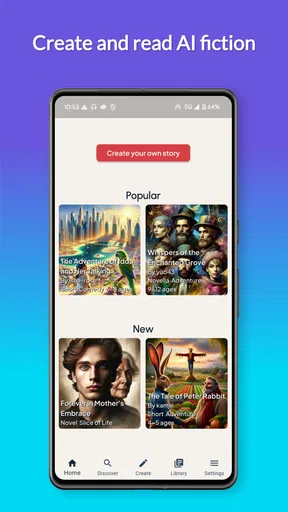
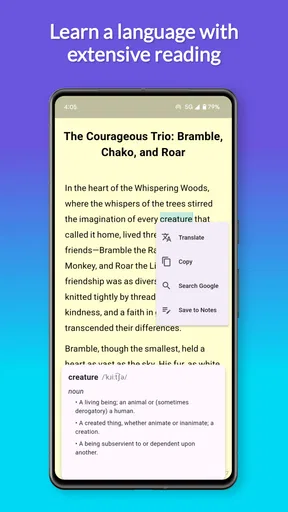
First things first, let's talk about getting started. Downloading Okudu AI - Create Stories was a breeze. Available on both Android and iOS, it took just a few taps, and I was in. The interface is super friendly. You know how some apps feel like you need a degree in rocket science to navigate? Not the case here! Everything is laid out clearly, making it easy to jump right into the action.
Create and Customize Your Story
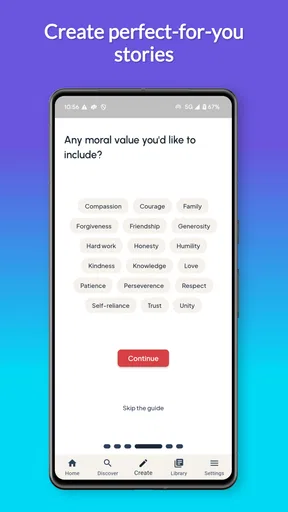
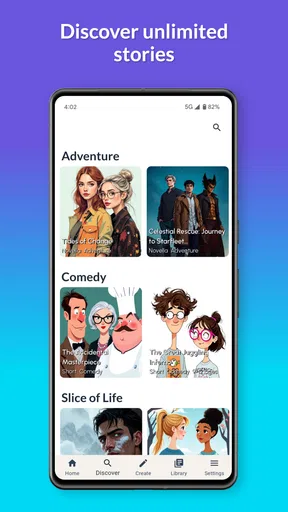
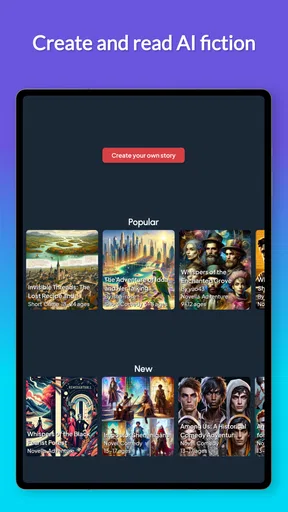
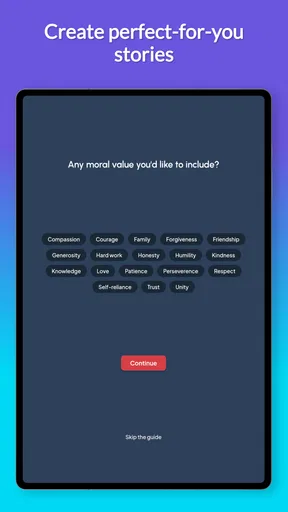
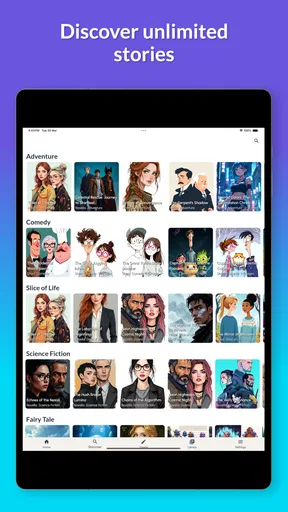
Once I was in, the real fun began. The app offers a wide array of story templates to choose from. Whether you’re into Sci-Fi, Romance, or even Thrillers, Okudu AI has got you covered. I decided to try my hand at a fantasy story. The customization options are quite extensive. You can tweak characters, settings, and plot points to your heart's content. It felt like having a mini writing studio in my pocket!
The AI-powered suggestions are a real game-changer. If you’ve ever faced the dreaded writer’s block, you’ll appreciate how the app offers prompts and suggestions to keep the creative juices flowing. At one point, I was stuck on how to develop a character, and the AI just swooped in with some great ideas. It’s like having a co-author who's always ready to brainstorm.
Share Your Masterpiece
Once you’ve crafted your masterpiece, sharing it is just as easy. The app allows you to publish your story directly or save it for later. I shared mine with a few friends, and the feedback was super positive. Plus, there's a whole community within the app where you can showcase your work and check out what others are creating. It's a great way to get inspired and maybe even collaborate with fellow storytellers.
A modest way to make sharing more useful is to ask for a specific kind of response. Instead of sending a draft with no direction, I might ask a friend whether the character’s choice makes sense or whether the ending feels earned. That keeps reactions focused on the part I’m trying to improve. If I’m only testing a premise, I can share that early sketch rather than polishing every line first.
I’d also think about whether I want a story to be public or simply saved for myself. Those are different uses: sharing can bring fresh ideas and reactions, while private drafting gives me room to try awkward versions without worrying about an audience. For someone who is shy about showing unfinished writing, saving a rough draft and sharing only after a personal edit may make the app’s creative process feel more comfortable.
User Experience and Interface
Let’s talk a bit more about the user experience. The design is sleek and modern, with intuitive navigation. I didn’t encounter any bugs or crashes, which is always a plus. The developers have done a great job ensuring that everything runs smoothly. I also loved how responsive the support team was when I had a question about a feature. Quick and helpful responses make a big difference.
Okudu is developed by Okudu, and it sits in the books and reference space while leaning into interactive creation rather than serving as a conventional digital library. That difference is important when comparing it with the usual alternatives. A reading app is built around discovering and consuming finished work; a standard notes app gives me a blank canvas but no creative prompts. Here, the attraction is the combination of fiction-making and AI suggestions, though readers who mainly want a curated catalogue of books may prefer a dedicated reading service.
The app has a 4.5 average from around 924 ratings, with about 220 written reviews, and has passed 10,000 installs. Those figures suggest that it has found an audience, but I would treat them as context rather than proof that its style will suit me. AI-generated fiction is personal: one reader may enjoy rapid, open-ended experimentation, while another may find the results need more shaping than they want to do.
Why You Should Try It
If you’re an aspiring writer or just someone who loves a good story, Okudu AI - Create Stories is worth checking out. It’s a fantastic way to unleash your creativity without feeling overwhelmed. Plus, the AI support means you’re never really alone in your writing process. It's like having a pocket-sized creative buddy that’s always ready to help.
My strongest recommendation is for people who enjoy playing with premises and are comfortable editing what they get back. It is less suited to anyone who wants a guaranteed polished result, a strictly controlled long-form writing environment, or a replacement for reading professionally edited fiction. If I were choosing between this and a conventional writing app, I’d pick Okudu for momentum and brainstorming, but choose the writing app for careful formatting and managing a finished manuscript.
The app is free to install, and its current version is 1.2.21, with Android 7.0 or later listed as the minimum requirement. I would check that my device meets that requirement before downloading. Since the experience includes optional purchases, I’d also decide in advance what I’m willing to spend; starting with a small creative experiment is a sensible way to judge whether I’ll use it often enough to justify more.
All in all, I’d say give it a go. Whether you want to craft an epic novel or just enjoy creating little snippets of stories, this app offers a fantastic platform to do so. With its user-friendly interface, comprehensive customization options, and supportive AI, you're in for a treat.
One everyday use I can easily imagine is turning a vague idea from a conversation or a dream into a short premise before it disappears. I’d capture the central image, choose a direction, then save the most promising version and revisit it when I have more time. The payoff is not necessarily a finished story that same day; it is having a concrete starting point instead of a half-remembered thought.
So, what are you waiting for? Dive into the world of storytelling with Okudu AI and start creating your own adventures today!
My final take
I’d recommend trying it if making stories sounds more appealing than simply browsing for something to read, and if you see AI as a collaborator for early ideas rather than an author you can leave unsupervised. Its approachable creative setup is the clear draw; the need to review, personalize, and sometimes pay for optional extras is the trade-off. For a curious fiction fan with a few minutes to experiment, that balance can be worthwhile. For a reader seeking finished books or a writer demanding fine-grained control, I’d look elsewhere.
Pros
- User-friendly interface for all ages.
- Generates creative story ideas quickly.
- Supports multiple languages seamlessly.
- Offers a variety of storytelling genres.
- Integrates with social media for sharing.
Cons
- Limited customization options for stories.
- Requires internet connection for use.
- Occasional AI-generated content errors.
- Subscription needed for premium features.
- No offline mode for story creation.
FAQs for Okudu AI - Create Stories
What is Okudu AI and how does it work?
Okudu AI is a storytelling app that uses artificial intelligence to help users create engaging stories. The app provides various templates and prompts, making it easy for users to craft narratives. It leverages AI to enhance creativity by suggesting plot twists and character developments, ensuring a unique storytelling experience.
Can I use Okudu AI for both personal and professional projects?
Yes, Okudu AI caters to both personal and professional storytelling needs. Whether you're a hobbyist looking to write for fun or a professional writer seeking inspiration, the app offers tools suitable for all levels. It supports various genres, from fiction to business storytelling, making it versatile for any project.
Does Okudu AI require an internet connection to function?
Yes, an internet connection is necessary for Okudu AI to function optimally. The app relies on cloud-based AI algorithms to generate story ideas and suggestions. While some features might work offline, the full capabilities of the app, including real-time updates and AI-driven insights, require connectivity.
Is Okudu AI suitable for beginners in writing?
Absolutely, Okudu AI is designed to be user-friendly for writers of all skill levels. Beginners will find the app's intuitive interface and AI-driven prompts particularly helpful in overcoming writer's block and developing their storytelling skills. The app provides guidance and suggestions, making it easy for new writers to start crafting stories.
Are there any in-app purchases or subscriptions required for Okudu AI?
Okudu AI offers a free version with basic features, but for advanced functionalities, users may need to purchase a subscription. The premium version unlocks additional templates, AI capabilities, and customization options. Users can choose a plan that best fits their needs, whether monthly or yearly, depending on their usage and requirements.


